Introduction
Many organisations using SystmOne are not aware that it is possible to launch the National Care Records Service (NCRS) directly from a patient record using simple system configuration — no development or integration work required.
By configuring a custom URL within SystmOne, users can create a seamless deeplink into NCRS that:
- Opens NCRS in the context of the current patient
- Passes the NHS number and user role profile from SystmOne to NCRS automatically
- Bypasses patient search and role selection screens in NCRS
This means clinicians and administrative users can move instantly from their local record in SystmOne into the corresponding national record in NCRS, significantly reducing friction and saving time.
This is particularly valuable where users need to access national capabilities that are not natively available within SystmOne, including:
- Patient Flags (e.g. Reasonable Adjustments, FGM-IS, Child Protection – CP-IS)
- Other national datasets surfaced via NCRS
The approach uses out-of-the-box functionality already available in SystmOne, making it quick to implement at both an individual and organisational level.
The steps below walk through how to configure this deeplink using SystmOne’s URL & Program Maintenance feature.
Prerequisites
- SystmOne users must be CIS2 authenticated (i.e. logged in with their Smartcard rather than username and password) for this to work seamlessly
- System Administrator access rights in SystmOne may be required for some of the steps described below
Step by step Instructions
- Navigate to Setup > Users & Policy > URL & Program Maintenance
- Click on New URL
- Select URL when asked “Do you want to create a URL or link to a program?”
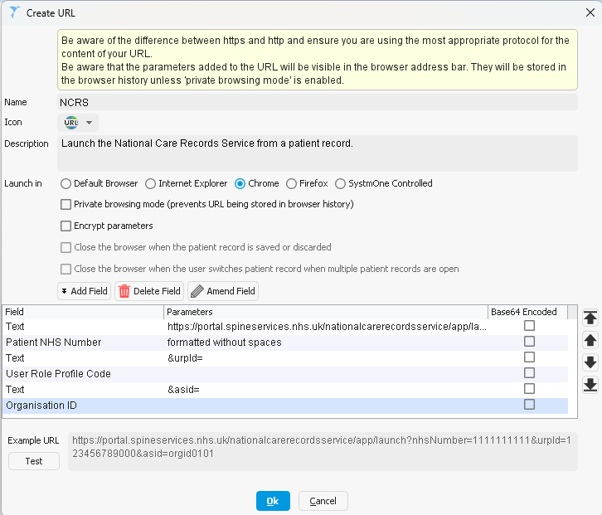
- Add an appropriate Name, Icon, and Description.
- Select a supported browser from the Launch in menu (Chrome is recommended)
- Right-click on the pre-populated Text field and select Amend field
- Copy the following base URL into the Text field and click Ok:
https://portal.spineservices.nhs.uk/nationalcarerecordsservice/app/launch?nhsNumber= - Click Add Field, select Patient NHS Number, select Without Spaces
- Click Add Field, select Text, and enter
&urpId= - Click Add Field and select User Role Profile Code
- Click Add Field, select Text, and enter
&asid= - Click Add Field and select Organisation ID
- The Example URL should look like this:
https://portal.spineservices.nhs.uk/nationalcarerecordsservice/app/launch?nhsNumber=1111111111&urpId=123456789000&asid=orgid0101 - Ensure that there are no spaces anywhere in the URL (remember to check for leading and trailing spaces)
- Click Ok
- On the URL & Program Maintenance screen, select your newly created URL and then click “Publish URL”
- Finally, add the URL to your toolbar in SystmOne. To do this for your own toolbar or to configure your organisation’s default toolbar, search for “Customising Toolbars” in SystmOne’s Online Help (press F1 to launch this).